Z3 2.0 Engine undertray & remote locking issue

Norm44

Zorg Addict
British Zeds
Joined
Jul 24, 2018
Points
50
Location
Locks Heath Hampshire UK
Model of Z
2.0
Hello can anybody help
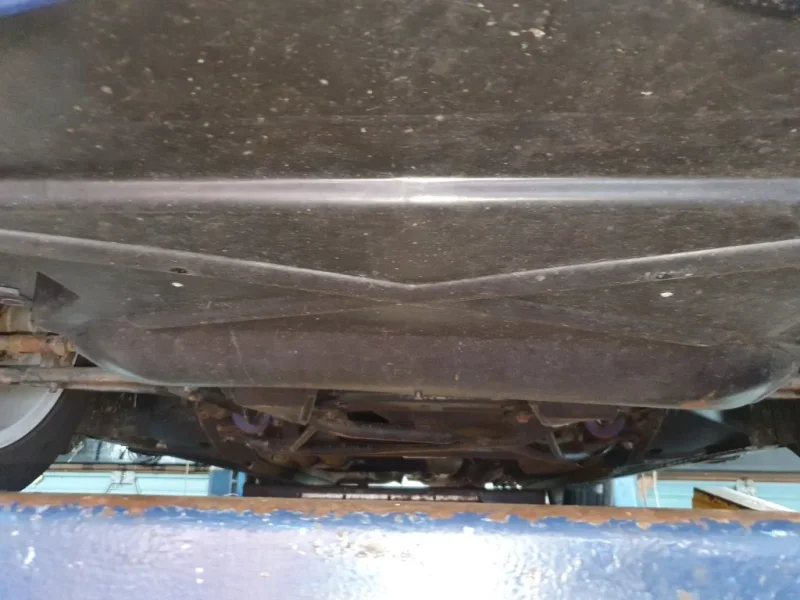
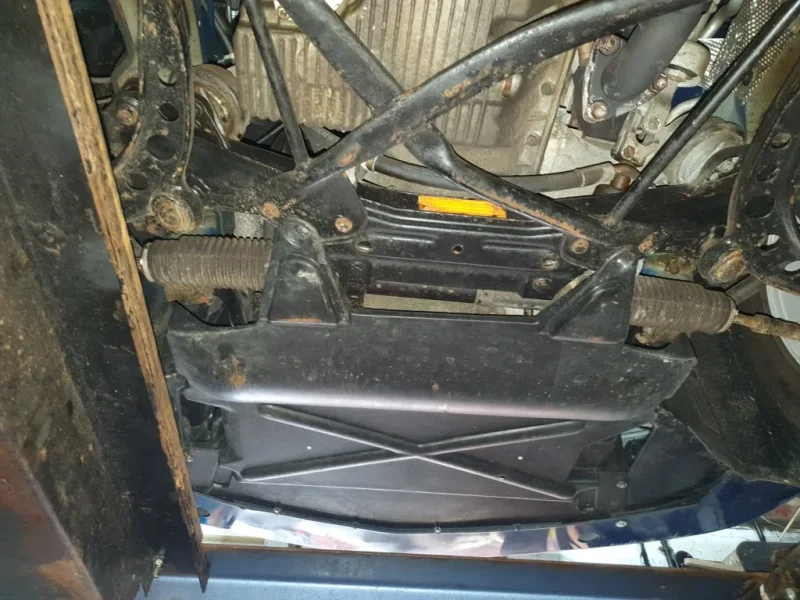
I’ve just got a 2.0 Z3 but unlike the other six cylinder ones I have had over the years it does not have a undertray under the engine. I believe there should be one.
Has any one got a photo of the underside of a 2.0 to show what it should look like?
I have read on other forums about long and short ones confusing?
Also
I can only lock the car by key in the door or boot lock
My car came without an interior mirror which has now been sourced and fitted.
My key fob remote won’t lock the doors. Can my key be programmed to the new mirror.
Any help would be most appreciated
Norm
 
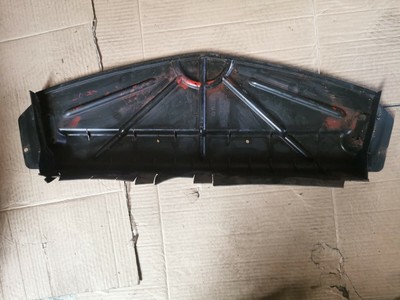
Can't help you with the remote control issues, but I can confirm that there's only one small undertray which ends right before the steering gear housing. I have no picture on my smartphone but this is what it looks like:


Can't help you with the remote control issues, but I can confirm that there's only one small undertray which ends right before the steering gear housing. I have no picture on my smartphone but this is what it looks like:

Can't help you with the remote control issues, but I can confirm that there's only one small undertray which ends right before the steering gear housing. I have no picture on my smartphone but this is what it looks like:

Thanks for your reply now I know what it looks like I will get one fitted
Thanks again
Norm
 
I presume you have just the key with the buttons on it, if so have you tried the syncing methods to pair the keys to the central locking, its a bit of a finger dance with the buttons but worth a try as the keys may well have lost sync with the car.
Here are the methods to try
Three methods to try:

Method 1:

1. Working from within the vehicle and with the doors shut

2. Turn ignition to position 1 and back to off within 5 seconds.

3. Remove the key from ignition and press and hold the unlock button for 15 seconds during this time press the key lock button 3 times within 5 seconds.

4. Release both buttons.

5. Doors will lock and unlock to show correct programming has occurred.


Method 2:

To do this procedure you need to have one working key and one key that needs to be programmed.

1) Get in and close all doors.

2) Turn on the ignition and turn off quickly. (No more than 5 seconds) to start the process. Next action must take place within 30 seconds.

3) Remove the 1st key.

4) Hold the key up near your left shoulder (this is so it is closer to the remote receiver antenna.

5) Hold down the unlock button and press the lock button 3 times. Release the unlock button and the doors lock which confirms the operation.

6) Quickly repeat steps 4 & 5 for key #2 etc.

If it does not work, try doing the keys in opposite order. Key 2 then key 1, vs 1 then 2.


Method 3:

Alternate if you do not have a working remote

1. Turn key to position 1 five times very quickly 2. Remove key 3. Hold unlock button then press lock button 3 times, release unlock button.

4. If you have another key do the same button pressing within 30 seconds 5. Turn on ignition to finalise.
 
I presume you have just the key with the buttons on it, if so have you tried the syncing methods to pair the keys to the central locking, its a bit of a finger dance with the buttons but worth a try as the keys may well have lost sync with the car.
Here are the methods to try
Three methods to try:

Method 1:

1. Working from within the vehicle and with the doors shut

2. Turn ignition to position 1 and back to off within 5 seconds.

3. Remove the key from ignition and press and hold the unlock button for 15 seconds during this time press the key lock button 3 times within 5 seconds.

4. Release both buttons.

5. Doors will lock and unlock to show correct programming has occurred.


Method 2:

To do this procedure you need to have one working key and one key that needs to be programmed.

1) Get in and close all doors.

2) Turn on the ignition and turn off quickly. (No more than 5 seconds) to start the process. Next action must take place within 30 seconds.

3) Remove the 1st key.

4) Hold the key up near your left shoulder (this is so it is closer to the remote receiver antenna.

5) Hold down the unlock button and press the lock button 3 times. Release the unlock button and the doors lock which confirms the operation.

6) Quickly repeat steps 4 & 5 for key #2 etc.

If it does not work, try doing the keys in opposite order. Key 2 then key 1, vs 1 then 2.


Method 3:

Alternate if you do not have a working remote

1. Turn key to position 1 five times very quickly 2. Remove key 3. Hold unlock button then press lock button 3 times, release unlock button.

4. If you have another key do the same button pressing within 30 seconds 5. Turn on ignition to finalise.
Thank you for this helpful information regarding the Key syncing.
I have now tried all these methods to sync my keys but none succeeded. My local garage were not able to sync the keys as well. 😪
So I am back to locking the car by key in the door
Once again Thanks for your Help
 
Thank you for this helpful information regarding the Key syncing.
I have now tried all these methods to sync my keys but none succeeded. My local garage were not able to sync the keys as well. 😪
So I am back to locking the car by key in the door
Once again Thanks for your Help
 
Can't help you with your locking problem but my experience with the undertray may be of interest my 3 0i had just a small splash guard in the nose, and as I live in the sticks it was as much use as a chocolate tea pot. I now have a larger tray which covers the underside from the nose to just beyond the steering rack. I don't know what model it was designed for but with a little enginuity and slight surgery it can be made to fit. On OEM it is the larger of the two illustrated. Overheating? it has been on for 11 years without problems. It is not the easiest thing in the world to photograph, but if you are interested I will try.
 
Hi Norm, the small under tray fills in the gap between the front bumper and the radiator(s) If with the bonnet open you can see the ground between the bumper and radiator then yes it's missing. If you see a sheet of grey foam then that's all you get on the 2.0. On the 2.2 this was extended back to the crossmember.
 
There’s another thread on here about an alarm not syncing which might be of interest…I think it is called “Dead Alarm” @Norm44
 
Last edited:
Can't help you with your locking problem but my experience with the undertray may be of interest my 3 0i had just a small splash guard in the nose, and as I live in the sticks it was as much use as a chocolate tea pot. I now have a larger tray which covers the underside from the nose to just beyond the steering rack. I don't know what model it was designed for but with a little enginuity and slight surgery it can be made to fit. On OEM it is the larger of the two illustrated. Overheating? it has been on for 11 years without problems. It is not the easiest thing in the world to photograph, but if you are interested I will try.
Hi Chris thanks for you post. some photos would be useful and any other guidance on extras & surgery required to fit
Thanks
Norm
 
Norm here are the pictures as promised
Cheers Chris
 

Attachments

  • 20210812_101244.webp
    20210812_101244.webp
    74.3 KB · Views: 114
  • 20210812_101304.webp
    20210812_101304.webp
    129.1 KB · Views: 110
I presume you have just the key with the buttons on it, if so have you tried the syncing methods to pair the keys to the central locking, its a bit of a finger dance with the buttons but worth a try as the keys may well have lost sync with the car.
Here are the methods to try
Three methods to try:

Method 1:

1. Working from within the vehicle and with the doors shut

2. Turn ignition to position 1 and back to off within 5 seconds.

3. Remove the key from ignition and press and hold the unlock button for 15 seconds during this time press the key lock button 3 times within 5 seconds.

4. Release both buttons.

5. Doors will lock and unlock to show correct programming has occurred.


Method 2:

To do this procedure you need to have one working key and one key that needs to be programmed.

1) Get in and close all doors.

2) Turn on the ignition and turn off quickly. (No more than 5 seconds) to start the process. Next action must take place within 30 seconds.

3) Remove the 1st key.

4) Hold the key up near your left shoulder (this is so it is closer to the remote receiver antenna.

5) Hold down the unlock button and press the lock button 3 times. Release the unlock button and the doors lock which confirms the operation.

6) Quickly repeat steps 4 & 5 for key #2 etc.

If it does not work, try doing the keys in opposite order. Key 2 then key 1, vs 1 then 2.


Method 3:

Alternate if you do not have a working remote

1. Turn key to position 1 five times very quickly 2. Remove key 3. Hold unlock button then press lock button 3 times, release unlock button.

4. If you have another key do the same button pressing within 30 seconds 5. Turn on ignition to finalise.
I presume you have just the key with the buttons on it, if so have you tried the syncing methods to pair the keys to the central locking, its a bit of a finger dance with the buttons but worth a try as the keys may well have lost sync with the car.
Here are the methods to try
Three methods to try:

Method 1:

1. Working from within the vehicle and with the doors shut

2. Turn ignition to position 1 and back to off within 5 seconds.

3. Remove the key from ignition and press and hold the unlock button for 15 seconds during this time press the key lock button 3 times within 5 seconds.

4. Release both buttons.

5. Doors will lock and unlock to show correct programming has occurred.


Method 2:

To do this procedure you need to have one working key and one key that needs to be programmed.

1) Get in and close all doors.

2) Turn on the ignition and turn off quickly. (No more than 5 seconds) to start the process. Next action must take place within 30 seconds.

3) Remove the 1st key.

4) Hold the key up near your left shoulder (this is so it is closer to the remote receiver antenna.

5) Hold down the unlock button and press the lock button 3 times. Release the unlock button and the doors lock which confirms the operation.

6) Quickly repeat steps 4 & 5 for key #2 etc.

If it does not work, try doing the keys in opposite order. Key 2 then key 1, vs 1 then 2.


Method 3:

Alternate if you do not have a working remote

1. Turn key to position 1 five times very quickly 2. Remove key 3. Hold unlock button then press lock button 3 times, release unlock button.

4. If you have another key do the same button pressing within 30 seconds 5. Turn on ignition to finalise.
I presume you have just the key with the buttons on it, if so have you tried the syncing methods to pair the keys to the central locking, its a bit of a finger dance with the buttons but worth a try as the keys may well have lost sync with the car.
Here are the methods to try
Three methods to try:

Method 1:

1. Working from within the vehicle and with the doors shut

2. Turn ignition to position 1 and back to off within 5 seconds.

3. Remove the key from ignition and press and hold the unlock button for 15 seconds during this time press the key lock button 3 times within 5 seconds.

4. Release both buttons.

5. Doors will lock and unlock to show correct programming has occurred.


Method 2:

To do this procedure you need to have one working key and one key that needs to be programmed.

1) Get in and close all doors.

2) Turn on the ignition and turn off quickly. (No more than 5 seconds) to start the process. Next action must take place within 30 seconds.

3) Remove the 1st key.

4) Hold the key up near your left shoulder (this is so it is closer to the remote receiver antenna.

5) Hold down the unlock button and press the lock button 3 times. Release the unlock button and the doors lock which confirms the operation.

6) Quickly repeat steps 4 & 5 for key #2 etc.

If it does not work, try doing the keys in opposite order. Key 2 then key 1, vs 1 then 2.


Method 3:

Alternate if you do not have a working remote

1. Turn key to position 1 five times very quickly 2. Remove key 3. Hold unlock button then press lock button 3 times, release unlock button.

4. If you have another key do the same button pressing within 30 seconds 5. Turn on ignition to finalise.
Thank you finally solved remote locking issue, got a 2nd replacement interior mirror and used Method 1
Now all working 😀
 
Hello can anybody help
I’ve just got a 2.0 Z3 but unlike the other six cylinder ones I have had over the years it does not have a undertray under the engine. I believe there should be one.
Has any one got a photo of the underside of a 2.0 to show what it should look like?
I have read on other forums about long and short ones confusing?
Also
I can only lock the car by key in the door or boot lock
My car came without an interior mirror which has now been sourced and fitted.
My key fob remote won’t lock the doors. Can my key be programmed to the new mirror.
Any help would be most appreciated
Norm
Finally solved remote locking issue, it was the interior mirror. I got a replacement and re synced the keys 😀
 
Back
Top