
Hi all,
You may well have noticed a new menu item appear this afternoon - Showcase
I will go in to this in more detail once we are ready for people to start adding their own cars. Or if you would prefer I can create it for you, then assign it to you!
Currently you can only VIEW, and not add to it.

Showcase is fully integrated in to the Xenforo software.
What Showcase does is to allow you to, err, showcase your car for all to see. This differs to the old style progress threads, in that it allows you to store the information on your car in a more structured way.
A 'showcase' can be linked to your existing progress thread (if you have one), so any discussion is carried on and the progress thread is still maintained.
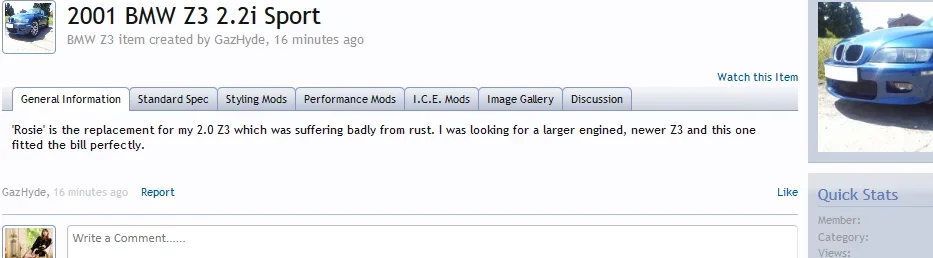
For example: I've created a new showcase item for Rosie. When I view on that showcase item, I'm presented with the following information I've chosen to include. These are all neatly grouped together in to tabbed sections.

Notice the 'discussion' tab?

If you view someones profile page, you can view their showcase items.

It's integrated in to the Alerts system as well, so anyone 'watching' your showcase will be alerted to any updates.

More details as and when I have finished tinkering with the settings!
Gary
You may well have noticed a new menu item appear this afternoon - Showcase
I will go in to this in more detail once we are ready for people to start adding their own cars. Or if you would prefer I can create it for you, then assign it to you!
Currently you can only VIEW, and not add to it.
Showcase is fully integrated in to the Xenforo software.
What Showcase does is to allow you to, err, showcase your car for all to see. This differs to the old style progress threads, in that it allows you to store the information on your car in a more structured way.
A 'showcase' can be linked to your existing progress thread (if you have one), so any discussion is carried on and the progress thread is still maintained.
For example: I've created a new showcase item for Rosie. When I view on that showcase item, I'm presented with the following information I've chosen to include. These are all neatly grouped together in to tabbed sections.
Notice the 'discussion' tab?
- If you have a current progress thread it will show that thread!
- If you don't have a current progress thread, it creates a new thread for you!
If you view someones profile page, you can view their showcase items.
It's integrated in to the Alerts system as well, so anyone 'watching' your showcase will be alerted to any updates.
More details as and when I have finished tinkering with the settings!
Gary