Default skin/theme updated to latest version

You're right Jim........ but not as we know it !!=))
 
Arrow to top of page gone AWOL .

If anyone is still having problems with this, if you click on the arrow next to Terms And Rules, you will go straight back up to top of page.
upload_2014-5-27_21-52-42.webp
 
Thanks Mike, I found that last night on the ipad. I still prefer the green one which follows you down the side of the page.;)
 
Thanks Mike, I found that last night on the ipad. I still prefer the green one which follows you down the side of the page.;)
Thanks for point that out Mike, I forgot to mention it last night. The developer has acknowledged it isn't working properly, so hopefully will get a fix soon.
 
Not good on a Kindle.
 
I found the green arrow at the bottom covered my text and got confused which letter I was on, lead to spelling mistakes which really bother me. There it's out in the open!! JIM
 
Ladies and gentlemen...

You should now see a green back to top arrow in the bottom corner of your screen. The latest theme update fixed the issue with it being unpredictable. However the developer changed how it worked, which I wasn't entirely happy with. He has given me this always on solution after I queried his thought process.

Let me know if you have any issues with it!

Gaz
 
Works for me Gary:)
 
@GazHyde, I have noticed since the latest update that when using my PC the screen layout has changed as per the image below. I do not get this format on my iPad, the centre section covers the page, any thoughts?
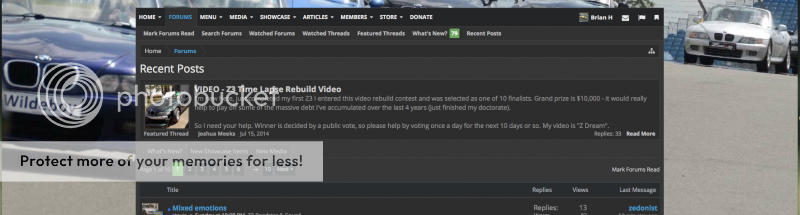
RecentPosts%7CBMWZ1Z4Z8Z3ForumandTechnicalDatabase-ZRoadsterorg.png
 
@GazHyde, I have noticed since the latest update that when using my PC the screen layout has changed as per the image below. I do not get this format on my iPad, the centre section covers the page, any thoughts?

RecentPosts%7CBMWZ1Z4Z8Z3ForumandTechnicalDatabase-ZRoadsterorg.png
I made the site fixed width @1168px maximum, which means no matter how wide your screen is the site will always stay at a maximum width. The primary reason for this is due to some new changes in the Featured Thread system, which now allows me to add an image slider on the home page. It will work fine on a fluid width (meaning it scales to the width of the screen) but on large screens the images stretch and look odd.

upload_2014-7-29_7-51-47.webp


I had wondered if anyone would notice, and it would only be those who have big monitors such as yourself and me. I probably should have mentioned it in this thread, but I've been making some small tweaks here and there and I don't want to bore people with too many details. Personally I'm like a kid in a candy shop with some of the new features - like the slider!
 
Back
Top